1. Create the Git repository
Create the Git repository
Create the repository
Your git repository stores and versions your Salesforce DX sources.
- Create a new repository on your Git platform (GitHub, GitLab, Azure DevOps or Bitbucket), for example myclient-sfdx
- Select
Initialize repository with a README
- Select
Create the major branches
In the branches section of your Git platform (for example Repository -> Branches on GitLab), create the branch tree that matches the complexity of your project.
Two decisions shape the tree: how many levels your BUILD chain needs, and whether urgent work gets a stream of its own.
How deep is your BUILD chain?
Each level is a branch and the Salesforce org it deploys to. Start with what you can staff, you can always add a level later.
| Project | Branch tree |
|---|---|
| Small | main (Production) > preprod (PreProd) |
| Medium | main (Production) > preprod (PreProd) > integration (Integration) |
| Complex | main (Production) > preprod (PreProd) > uat (UAT) > integration (Integration) |
The rest of this documentation uses the complex tree, integration > uat > preprod > main, because it names every level. Drop the ones you do not have.
Pattern A: BUILD and hotfixes
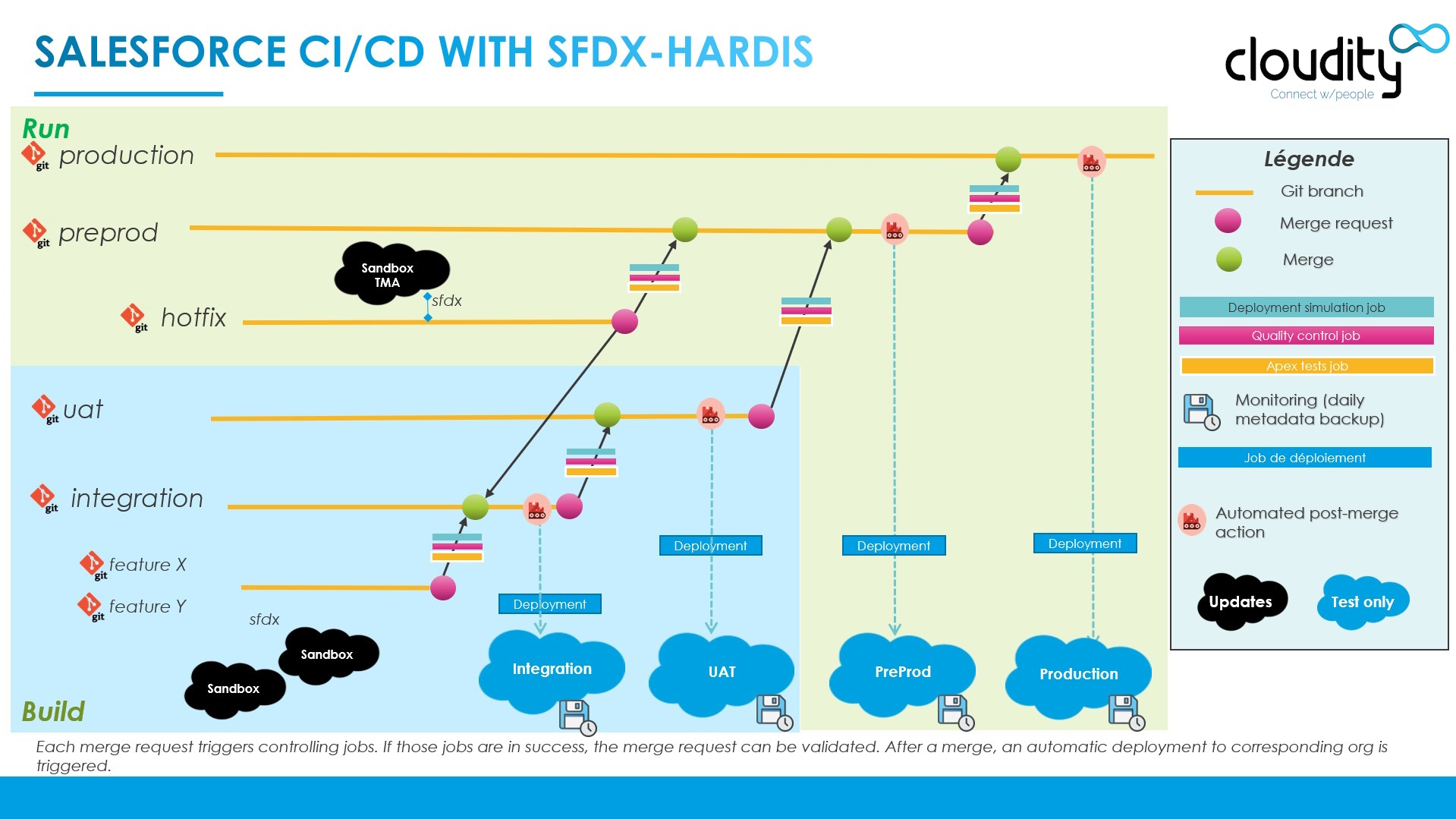
The usual setup. User Stories climb the BUILD chain, and an urgent fix that cannot wait merges straight into preprod from its own branch, then goes to production with the next preprod > main merge.
%%{init: {"theme": "base", "themeVariables": {"primaryColor": "#eaf5fe", "primaryTextColor": "#032d60", "primaryBorderColor": "#0176d3", "lineColor": "#0176d3", "secondaryColor": "#f3f3f3", "tertiaryColor": "#ffffff", "fontFamily": "Salesforce Sans, Arial, sans-serif"}}}%%
flowchart LR
    FEAT["feature/*<br/>User Stories"] --> INTEG["integration"]
    INTEG --> UAT["uat"]
    UAT --> PREPROD["preprod"]
    HOTFIX["hotfix<br/>User Stories"] --> PREPROD
    PREPROD --> MAIN["main<br/>production"]
    style HOTFIX fill:#fff7e0,stroke:#dd7a01
    style MAIN fill:#fef1ee,stroke:#ea001e
See Hotfixes for the process, and Retrofit for the step that brings the fix back down into the BUILD branches.
The same model, seen as a git history with its orgs:
Pattern B: BUILD, RUN and hotfixes
When the maintenance work is steady enough to need its own validation org, add a uat_run branch below preprod, parallel to the BUILD chain:
- RUN User Stories (small changes and fixes that are not urgent) merge into
uat_run, get validated in its org, and reachpreprodwith the next promotion; - hotfix User Stories still merge directly into
preprod, because they cannot wait for anything.
%%{init: {"theme": "base", "themeVariables": {"primaryColor": "#eaf5fe", "primaryTextColor": "#032d60", "primaryBorderColor": "#0176d3", "lineColor": "#0176d3", "secondaryColor": "#f3f3f3", "tertiaryColor": "#ffffff", "fontFamily": "Salesforce Sans, Arial, sans-serif"}}}%%
flowchart LR
    FEAT["feature/*<br/>BUILD User Stories"] --> INTEG["integration"]
    INTEG --> UAT["uat"]
    UAT --> PREPROD["preprod"]
    RUN_STORIES["RUN<br/>User Stories"] --> UATRUN["uat_run"]
    UATRUN --> PREPROD
    HOTFIX["hotfix<br/>User Stories"] --> PREPROD
    PREPROD --> MAIN["main<br/>production"]
    style RUN_STORIES fill:#eaf5fe,stroke:#0176d3
    style UATRUN fill:#e3f7e8,stroke:#2e844a
    style HOTFIX fill:#fff7e0,stroke:#dd7a01
    style MAIN fill:#fef1ee,stroke:#ea001e
sfdx-hardis recognizes uat_run (and uatrun) as a RUN branch, and labels it as such in the DevOps Pipeline. Create its Salesforce org like any other major org, and add it to availableTargetBranches so developers can pick it when they start a User Story.
Protect the major branches
Protected branches can only be updated through Pull Requests (Merge Requests on GitLab). This avoids accidental pushes to a branch that deploys to an org.
In your Git platform settings (for example Settings -> Repository on GitLab):
- Define your development target branch (usually integration) as the default branch
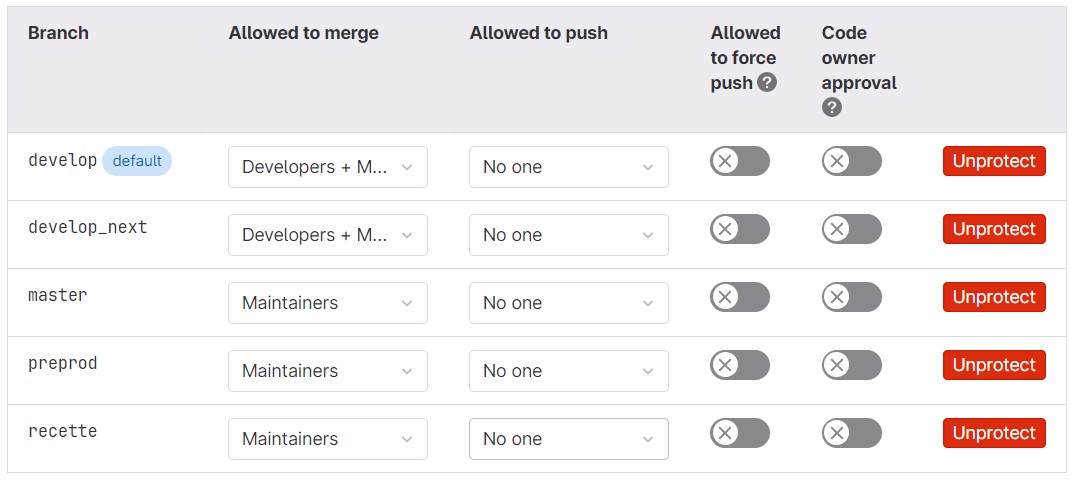
- Protect all branches that have a corresponding Salesforce org (main, preprod, uat, integration...)
The recommended practice is to allow only release managers (role Maintainer on GitLab) to merge into the protected branches, except integration.
Example on GitLab:
Define the merge rules
Make sure that the control jobs of a Pull Request must pass before it can be merged. You can deactivate this rule later, at your own risk.
On GitLab:
- Go to
Settings -> General, then expand theMerge requestssection - Leave all default values, except the checkbox Pipelines must succeed, which must be checked
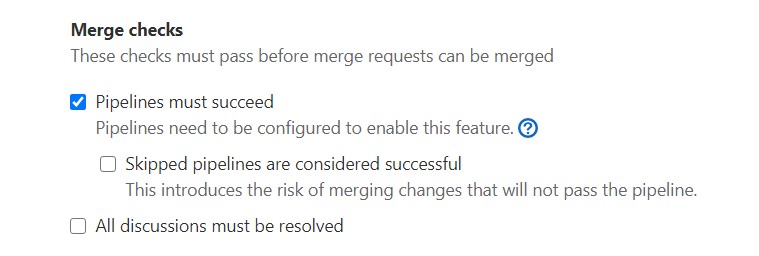
On other platforms, use the equivalent setting: required status checks in the branch protection rules (GitHub), build validation in the branch policies (Azure DevOps), or merge checks (Bitbucket).
You can now go to step 2. Prepare the Salesforce orgs.