hardis:org:diagnose:mfa
Description
Command Behavior
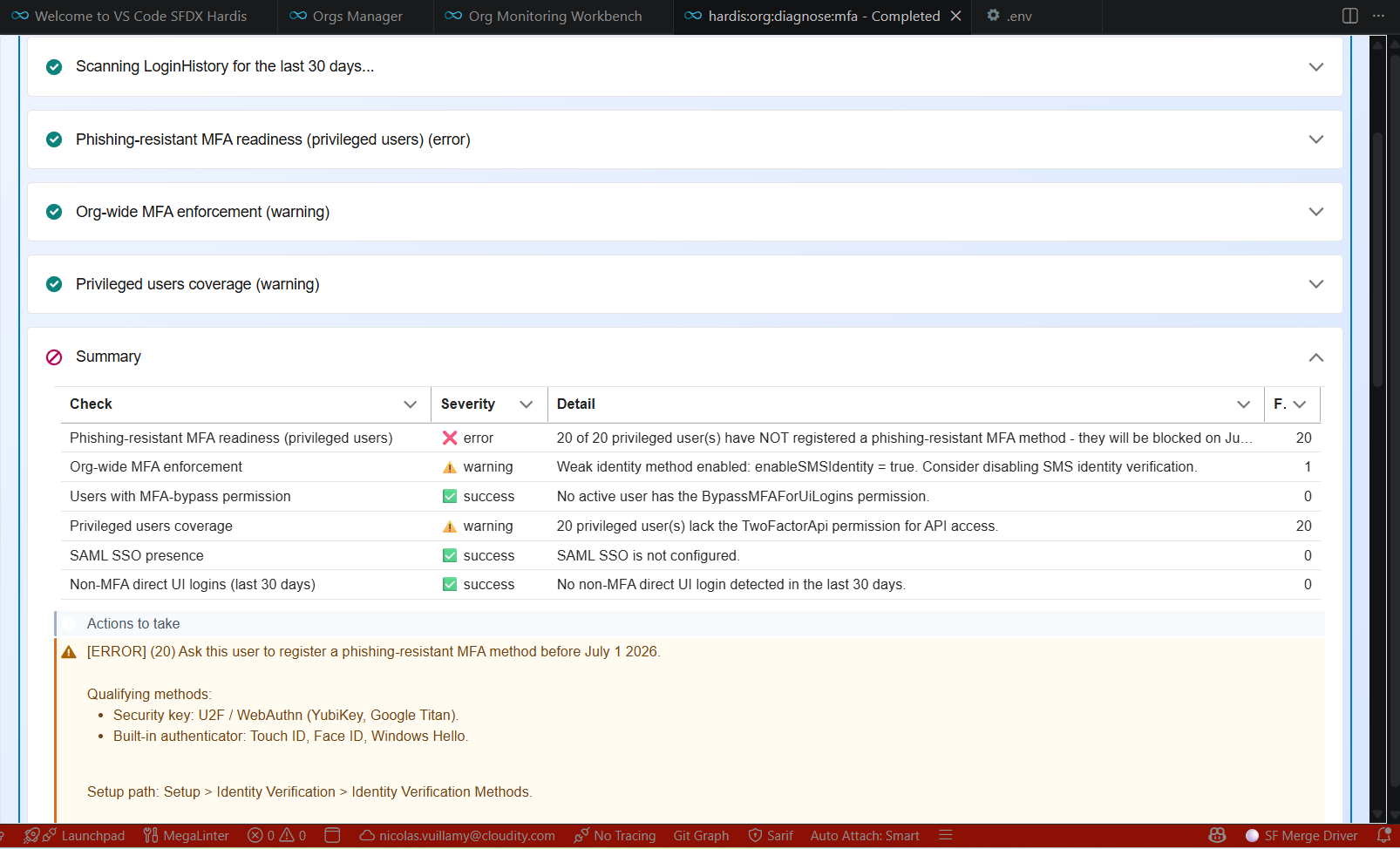
Audits the org's Multi-Factor Authentication (MFA) configuration and reports gaps that violate the Salesforce MFA requirement.
This monitoring command runs six independent checks against the target org and emits a single MFA_CONFIG notification with the consolidated findings.
Key checks:
- Phishing-resistant MFA readiness. The primary check for the Salesforce enforcement rolling out to privileged users. It verifies that a phishing-resistant method can be registered at all (
enableBuiltInAuthenticator/enableU2F), then inspects the latest successfulVerificationHistoryentry of every privileged user over the lookback window: anything outsideU2F,BuiltInAuthenticator,WebAuthnRoamingAuthenticatorandPwlessPasskeymeans the user is blocked once the enforcement wave reaches the org. - Org-wide MFA enforcement. Reads
SecuritySettings.Metadata.sessionSettingsvia the Tooling API to inspectenableMFADirectUILoginOptIn, and scans recentLoginHistoryfor at least oneStatus = 'Multi-factor required'event to detect platform-level enforcement. Weak identity methods (enableSMSIdentity,canConfirmIdentityBySmsOnly) downgrade the result to a warning. It also reportsskipSFAWhenMFADirectUILogin, which decides whether the verification-method registration screen opens on the full method list or offers a single method first - a usual reason users report being pushed towards a specific method when any MFA method would do. - Users with the MFA-bypass permission. Lists every active Standard user whose assigned Profile, Permission Set or Permission Set Group carries
PermissionsBypassMFAForUiLogins = true. The field is not provisioned in every org edition, so its existence is verified with a describe call first; when absent, the check passes with an explanation instead of crashing. - Privileged users coverage. For users granted
ModifyAllData,ViewAllData,CustomizeApplication, orAuthorApex(configurable) through any Profile, Permission Set or Permission Set Group, the report shows whether each privileged user also holds the MFA-bypass permission (error) or lacks the API MFA permissionPermissionsTwoFactorApi(warning). - SSO presence. Detects SAML SSO via
singleSignOnSettings.enableSamlLoginin the same SecuritySettings metadata. When SSO is on the report adds an informational reminder to verify MFA at the IdP, which sfdx-hardis cannot introspect. - Non-MFA direct UI logins. Scans
LoginHistoryover the configurable lookback window (default 30 days) forLoginType = 'Application'successes whoseAuthMethodReferencecontains no strong-auth token (mfa,swk,fido,wia,hwk,face,fpt,otp). Records with a nullAuthMethodReferenceare skipped (genuinely unknown), so this check only fires on confirmed non-MFA sessions.
The severity rollup is:
- error if any privileged user is not phishing-resistant ready, no phishing-resistant method is available for registration, org-wide MFA enforcement is missing, any privileged user has the bypass permission, or any non-MFA direct UI login was detected.
- warning if any other finding is present (non-privileged bypass user, privileged users missing API MFA, weak identity setting, or SSO is enabled without an asserted IdP MFA policy).
- log when every check passes.
Exclusions:
- Users listed in the project config key
monitoringMfaIgnoreUsersor the env varMONITORING_MFA_IGNORE_USERS(comma-separated) are skipped from checks #2, #3 (only for ignore-overlapping cases) and #5. - Users with
UserType != 'Standard'(integration users, Chatter Only, etc.) are not flagged in any per-user check.
This command is part of sfdx-hardis Monitoring and produces Grafana, Slack, Microsoft Teams, Google Chat, and email notifications.
Agent Mode
Supports non-interactive execution with --agent:
sf hardis:org:diagnose:mfa --agent --target-org myorg@example.com
In agent mode the command is fully non-interactive (there is no prompt in the happy path); the flag exists for consistency with the rest of the monitoring suite.
Technical explanations
The command's implementation:
- Tooling API:
SELECT Id, Metadata FROM SecuritySettings LIMIT 1to retrieve session and SSO settings. - SOQL: privileged and bypass users are found by filtering
PermissionSetAssignmenton thePermissionSet.Permissions*relationship, which is the shape Salesforce publishes to identify privileged users. It is the only one covering all three grant paths at once: profiles (through the permission set they own,Type = 'Profile'), plain permission sets, and permission set groups (through their aggregate permission set,Type = 'Group'). Filtering the member permission sets first and joining onPermissionSetIdsilently missed every user whose permissions come from a group. TheProfileobject is still queried directly as a fallback. - Describe calls on
PermissionSetandProfileconfirmPermissionsBypassMFAForUiLoginsexists before any SOQL references it (the field is missing in some org editions and would throw INVALID_FIELD). When absent, the bypass check is reported as passed and the field is dropped from the privileged-user queries. - SOQL:
VerificationHistoryfiltered on the privileged user ids, in chunks of 200, so theIN ()clause stays below the SOQL statement length limit on orgs with many admins. - SOQL:
LoginHistoryoverLAST_N_DAYS:Nwith client-side filtering onStatus,LoginTypeandAuthMethodReferencebecauseStatuscannot be filtered in a WHERE clause. - TwoFactorMethodsInfo is intentionally not queried: Salesforce does not allow runtime SOQL access to it from a CLI session, so per-user method registration cannot be introspected.
- Reports: a single CSV / XLSX (
mfa-config-<date>) listing every check row and a per-check summary table in the console.
Reference: Salesforce MFA Requirement.
Parameters
| Name | Type | Description | Default | Required | Options |
|---|---|---|---|---|---|
| agent | boolean | Run in non-interactive mode for agents and automation | |||
| debug -d |
boolean | Activate debug mode (more logs) | |||
| flags-dir | option | Import flag values from a directory. | |||
| ignore-users | option | Comma-separated list of usernames to exclude from MFA checks (merged with monitoringMfaIgnoreUsers config and MONITORING_MFA_IGNORE_USERS env var). | |||
| json | boolean | Format output as json. | |||
| lookback-days | option | Number of days back to scan LoginHistory for non-MFA direct UI logins. Overrides monitoringMfaLoginHistoryLookbackDays from config. | |||
| phishing-resistant-lookback-days | option | Number of days back to scan VerificationHistory for phishing-resistant MFA registration / usage per privileged user. Overrides monitoringMfaPhishingResistantLookbackDays from config (default: 180). | |||
| privileged-permissions | option | Comma-separated list of PermissionSet/Profile permission API names that define a privileged user. Defaults to PermissionsModifyAllData,PermissionsViewAllData,PermissionsCustomizeApplication,PermissionsAuthorApex. | |||
| skipauth | boolean | Skip authentication check when a default username is required | |||
| target-org -o |
option | Username or alias of the target org. Not required if the target-org configuration variable is already set. |
true | ||
| websocket | option | Websocket host:port for VsCode SFDX Hardis UI integration |
Examples
$ sf hardis:org:diagnose:mfa
$ sf hardis:org:diagnose:mfa --target-org myorg@example.com
$ sf hardis:org:diagnose:mfa --lookback-days 60
$ sf hardis:org:diagnose:mfa --ignore-users 'integration@x.com,break-glass@x.com'
$ sf hardis:org:diagnose:mfa --agent