Overview
Salesforce CI/CD with sfdx-hardis
Run a production-grade Salesforce CI/CD pipeline on the Git platform, runners and tools you already use. No vendor lock-in, no extra license, no data leaving your infrastructure.
Used in production by major companies worldwide. Open-source and free, with optional Cloudity Professional Services for setup, support and release management.
Why sfdx-hardis?
There are many ways to do DevOps with Salesforce. Each has its advantages and limitations.
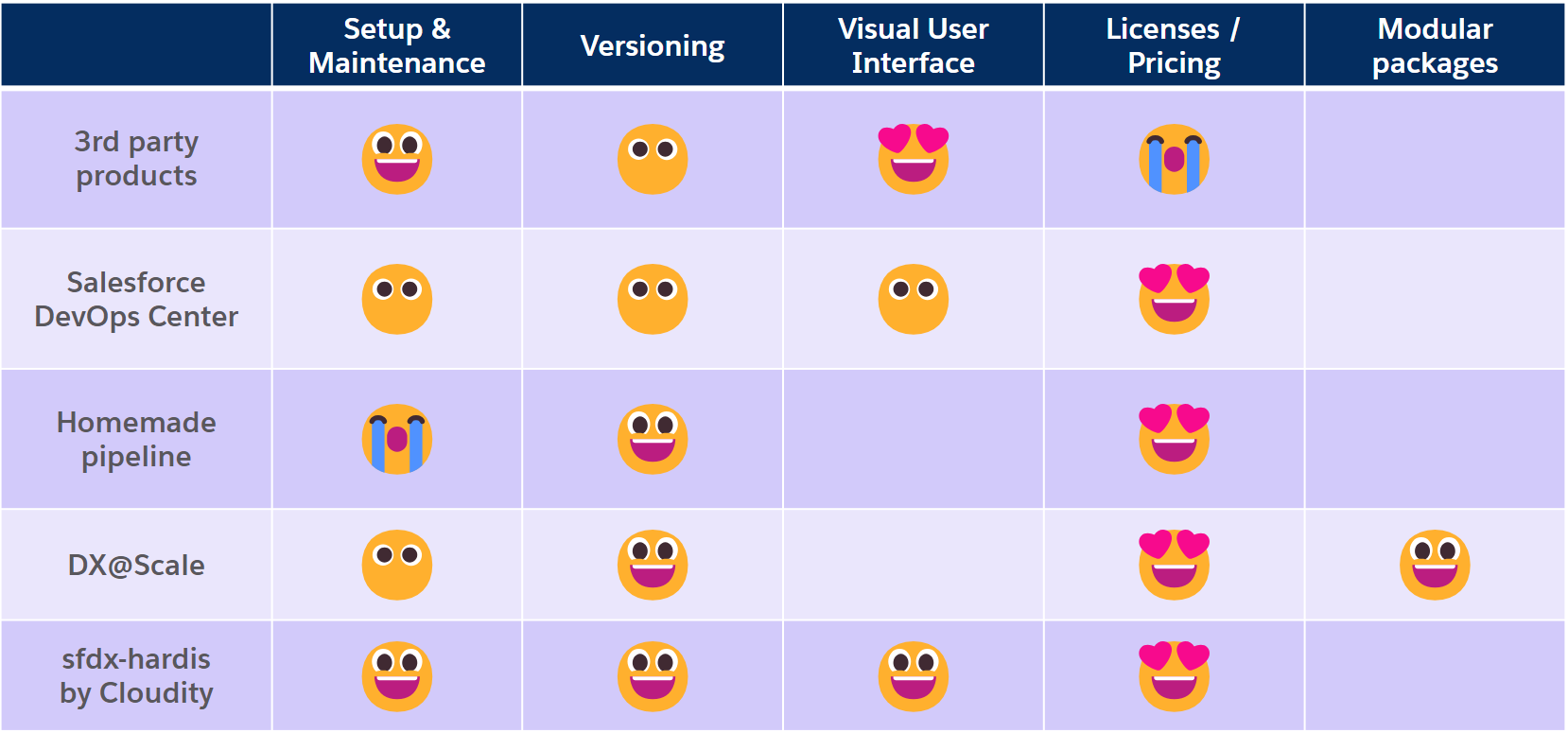
- Admin-friendly: every persona (admin, developer, release manager, project lead) is autonomous. Admins build Pull Requests with clicks in the VS Code extension, without a command line.
- Your tools, your infrastructure: there are no "sfdx-hardis servers". Everything runs in your Git platform, your CI runner and your VS Code. Cloudity has no access to your data.
- Smart deployments: delta deployments, overwrite protection, smart Apex test selection and automated source cleaning make deployments faster and safer.
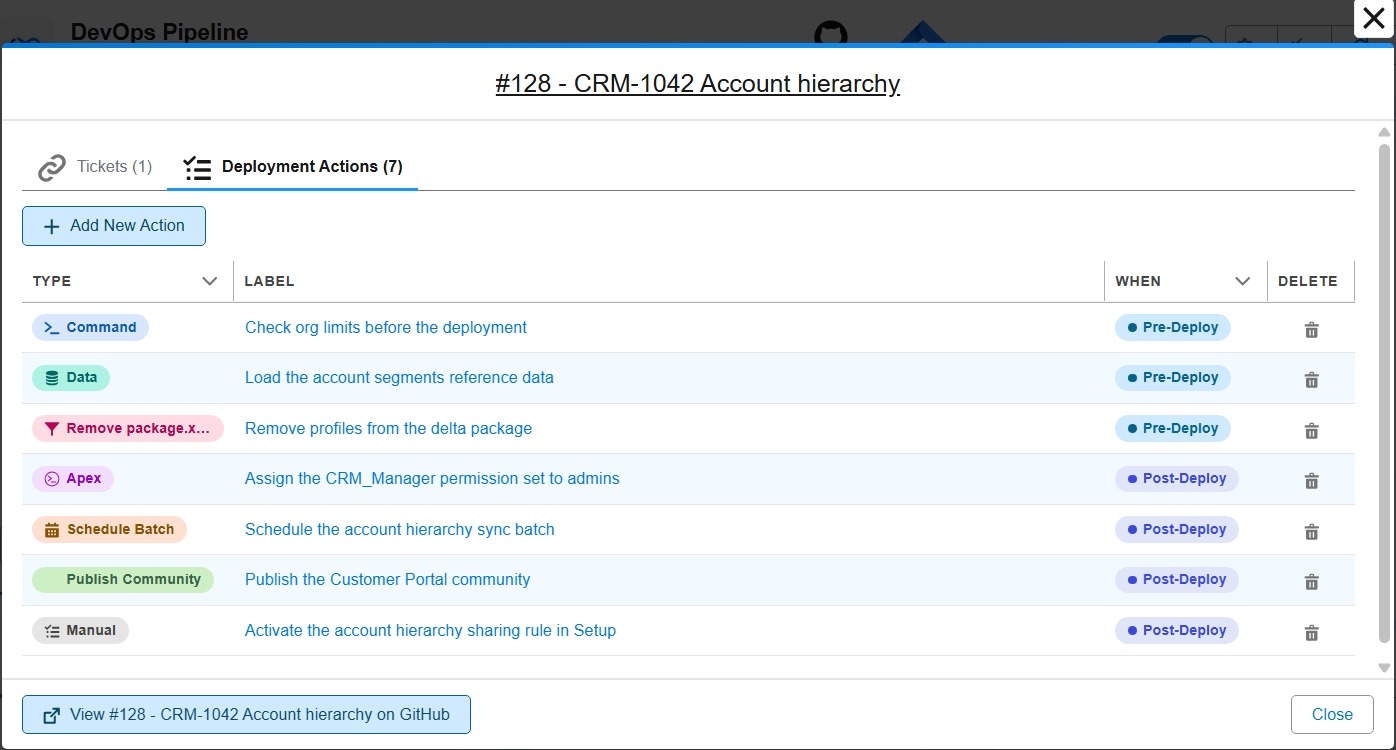
- Deployment actions: the steps around a deployment (data loads, Apex scripts, site publishing, scheduled jobs, manual checks) are declared on the Pull Request and run automatically in every org.
- AI-agent ready: 130+ commands support an
--agentflag for non-interactive execution by Claude Code, GitHub Copilot, Codex, Gemini and others. - No license fees: open-source. Many vendors charge 250+ EUR per contributor per month for the same workflow.
- Monitoring included: a daily metadata backup and observability layer runs in a separate monitoring repository, on the same Git platform and CI runner.
- Documentation included: generate a searchable documentation website of your whole project (Flows, Objects, Profiles, Apex, Lightning Pages), with AI-written explanations and visual Flow diff history.
Who uses it
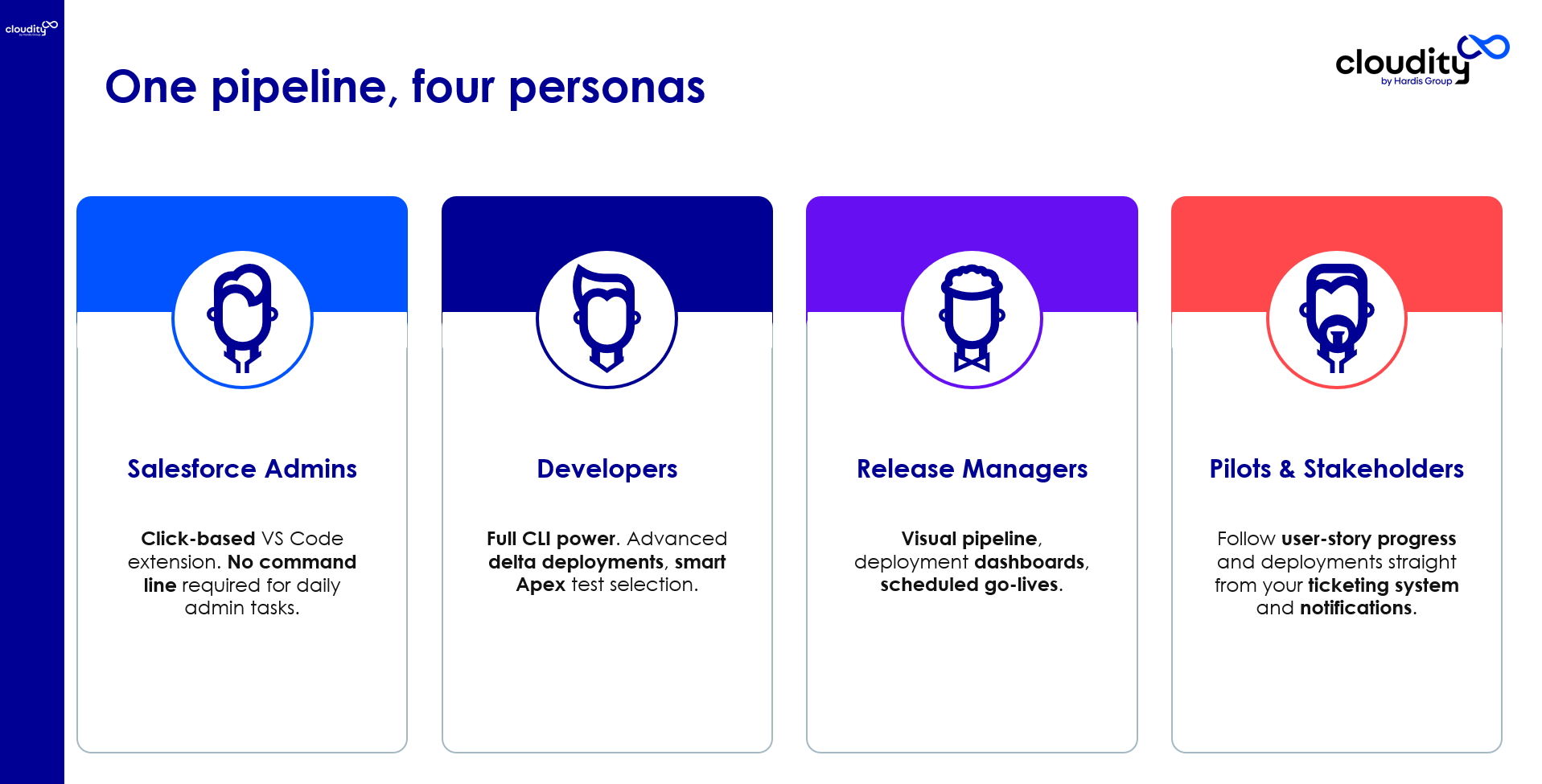
| Role | How they use sfdx-hardis |
|---|---|
| Admins | Build Pull Requests from the VS Code extension with clicks. No command line. |
| Developers | Same as admins, plus the Advanced mode of the UI to see the Salesforce CLI commands that run under the hood. |
| Release Managers | Configure the pipeline with the Pipeline Settings panel, track Pull Requests and deployments in the DevOps Pipeline view, generate release notes and DORA reports. |
| Project Managers | Follow the application lifecycle through the native integrations with Jira and Azure Boards. |
One workflow, from User Story to production
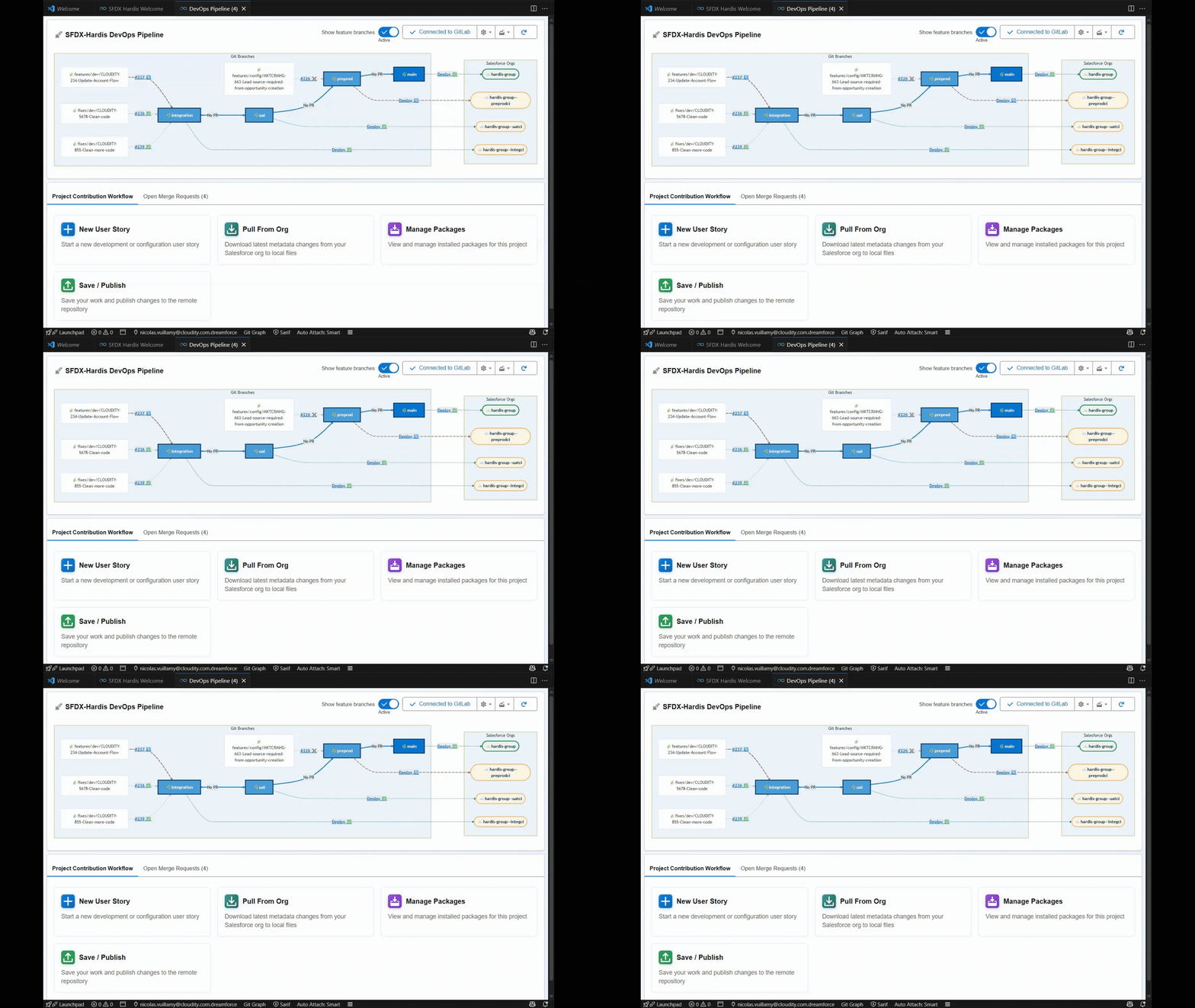
The DevOps Pipeline panel of the VS Code extension guides contributors through the whole cycle. Each card runs a guided command: no Git or Salesforce CLI knowledge required.

- Start a User Story: a Git branch is created and a dev sandbox or scratch org is assigned to it.
- Work in your org: configure and develop in Salesforce Setup or VS Code, as usual.
- Publish your User Story: retrieve your changes with the Metadata Retriever, commit the ones you want to publish, then Save / Publish. The manifest is updated, the sources are cleaned, the commit is pushed and the Pull Request is created.
- Check the Pull Request: the CI server simulates the deployment, runs the Apex tests and the quality checks, and posts the results as comments on the Pull Request.
- Review, merge and deploy: once merged, the CI server deploys to the matching org, runs the deployment actions, notifies the team and updates the tickets.
What you get
Smart deployments
- Delta deployments: deploy only what changed.
- Overwrite management: protect metadata that must never be overwritten by the pipeline.
- Smart Apex test runs: skip tests that cannot break on sandbox Pull Requests.
- Automated source cleaning: tidy profiles, flow positions and more before each Pull Request.
- Quick Deploy: reuse the validated deployment after the merge instead of deploying twice.
Deployment actions
Deploying a User Story is not always just about metadata. With deployment actions, contributors declare on their Pull Request what must happen before or after the deployment: run a command, import data with SFDMU, run an Apex script, publish an Experience Cloud site, schedule an Apex batch, remove items from package.xml, or remind a human to do something in Setup. sfdx-hardis runs them in every org the User Story reaches, once per org, and tracks what has been done in a Pull Request comment.
Releases and reporting
- Release Notes: generated from the Git history, the tickets, the metadata changes and the deployment actions. Markdown, PDF and XLSX outputs, with an optional AI summary.
- DORA Metrics: Deployment Frequency, Lead Time for Changes, Change Failure Rate and MTTR, scored Elite / High / Medium / Low against industry benchmarks.
- Backpromote (Beta): bring the changes merged in a parent branch back into a developer's sandbox, with org conflict detection and diff reports.
Integrations
- Slack, Microsoft Teams and email notifications with detailed deployment results.
- Jira, Azure Boards or any other ticketing tool: tickets are linked in Pull Request comments and updated when they reach an org.
- Deployment Agent: explains deployment errors with built-in rules and AI (Agentforce, or direct calls to OpenAI, Anthropic or Gemini).
Read the Smart Deploy internals page to see how all these pieces fit together in a single deployment.
Plays nicely with your stack
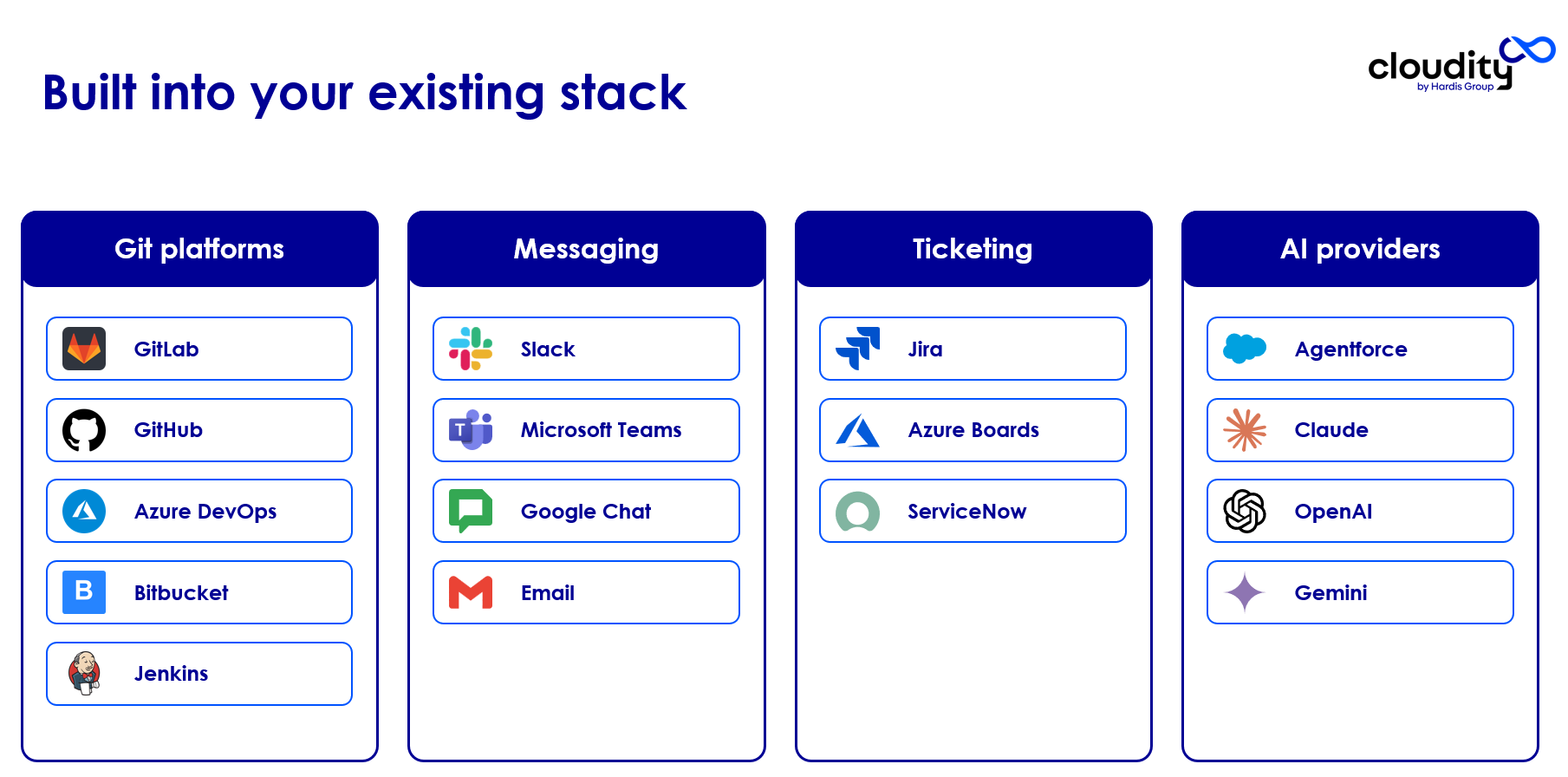
- Git and CI/CD: GitHub, GitLab, Bitbucket, Azure DevOps, Gitea, Jenkins
- Messaging: Slack, Microsoft Teams, Google Chat, Email
- Ticketing: Jira, Azure Boards, or anything else via webhooks
- AI: Agentforce, OpenAI, Anthropic, Gemini, Ollama
- Observability: Grafana, Vector.dev (DataDog, Splunk...)
Compliance stays in your hands: it depends on the tools you already operate (Git platform, runner, Jira, AI providers, SSO) and on the security policies you apply to them.
AI-agent ready
Every command that asks questions also supports an --agent flag that switches to fully non-interactive execution:
- No tokens wasted on menus: agents skip the multi-choice prompts.
- Predictable execution: required values are passed as CLI flags. The command fails fast with a clear error when something is missing.
- Safe defaults: sensible defaults apply when prompts are skipped. Destructive operations still need an explicit flag.
With 130+ commands supporting --agent, your coding agent can drive the whole Salesforce DevOps lifecycle: create User Stories, deploy metadata, run diagnostics, purge obsolete data, manage packages.
See Work with AI coding agents for the full picture.
Ready-to-use pipeline templates
The deployment simulation results are posted as comments on every Pull Request.
| Platform | CI/CD template |
|---|---|
| GitLab | GitLab CI configuration |
| Azure DevOps | Azure Pipelines checks, Azure Pipelines deployment |
| GitHub & Gitea | GitHub Actions / Gitea workflow checks, GitHub Actions / Gitea workflow deployment |
| Bitbucket | Bitbucket Pipelines |
| Jenkins | Jenkinsfile |
The pipelines adapt to other platforms like TeamCity.
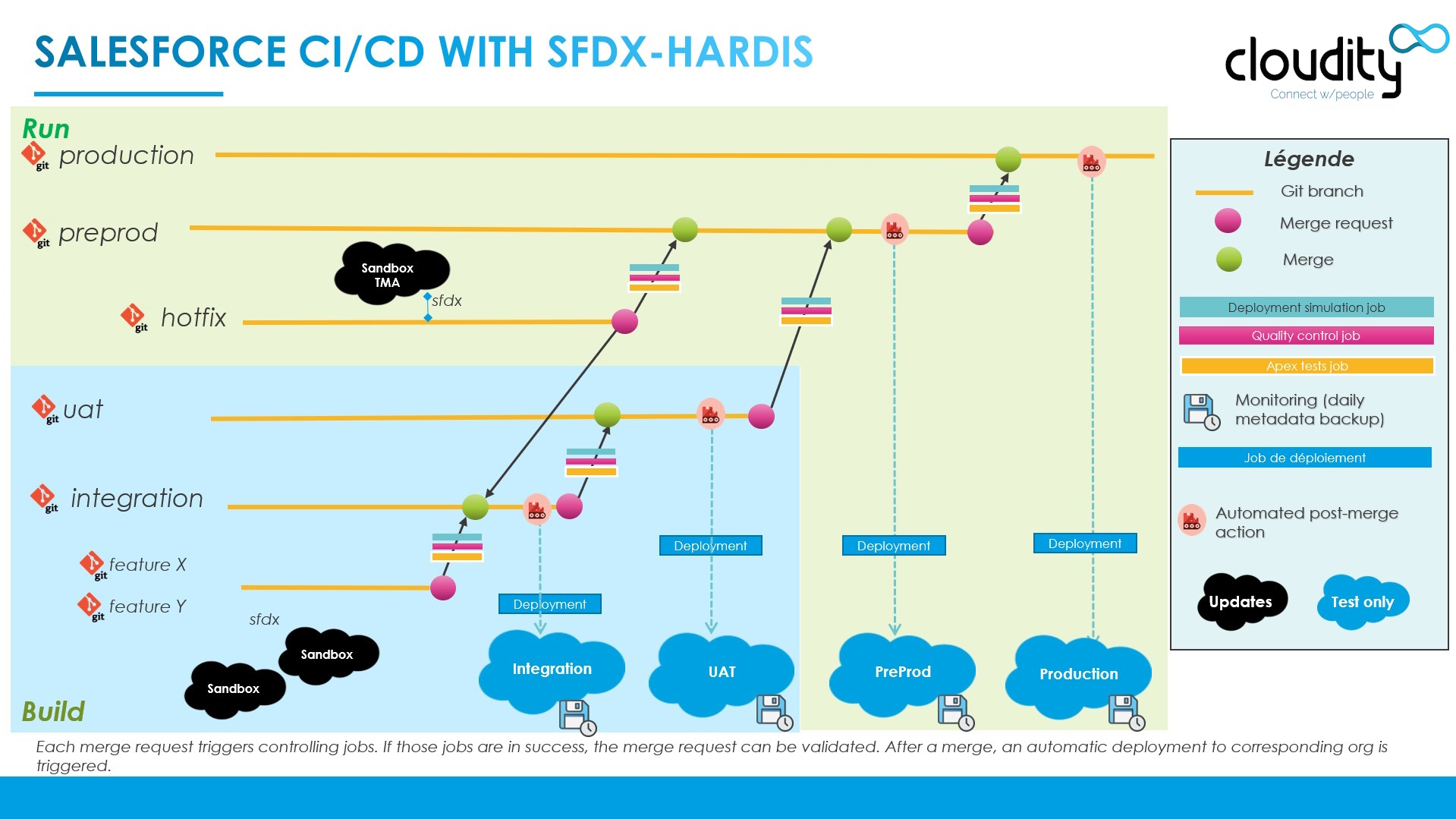
An advanced branch and org model you can build with sfdx-hardis. Simpler RUN-only models also work:
For more questions and answers, see this article:

Monitoring on the same Git platform
CI/CD is only half the story. Once your changes reach production, you still need to know what is happening in your orgs. sfdx-hardis ships with a Monitoring layer that lives in its own repository (separate from the CI/CD one), on the same Git platform and CI runner. No extra license, no extra platform.
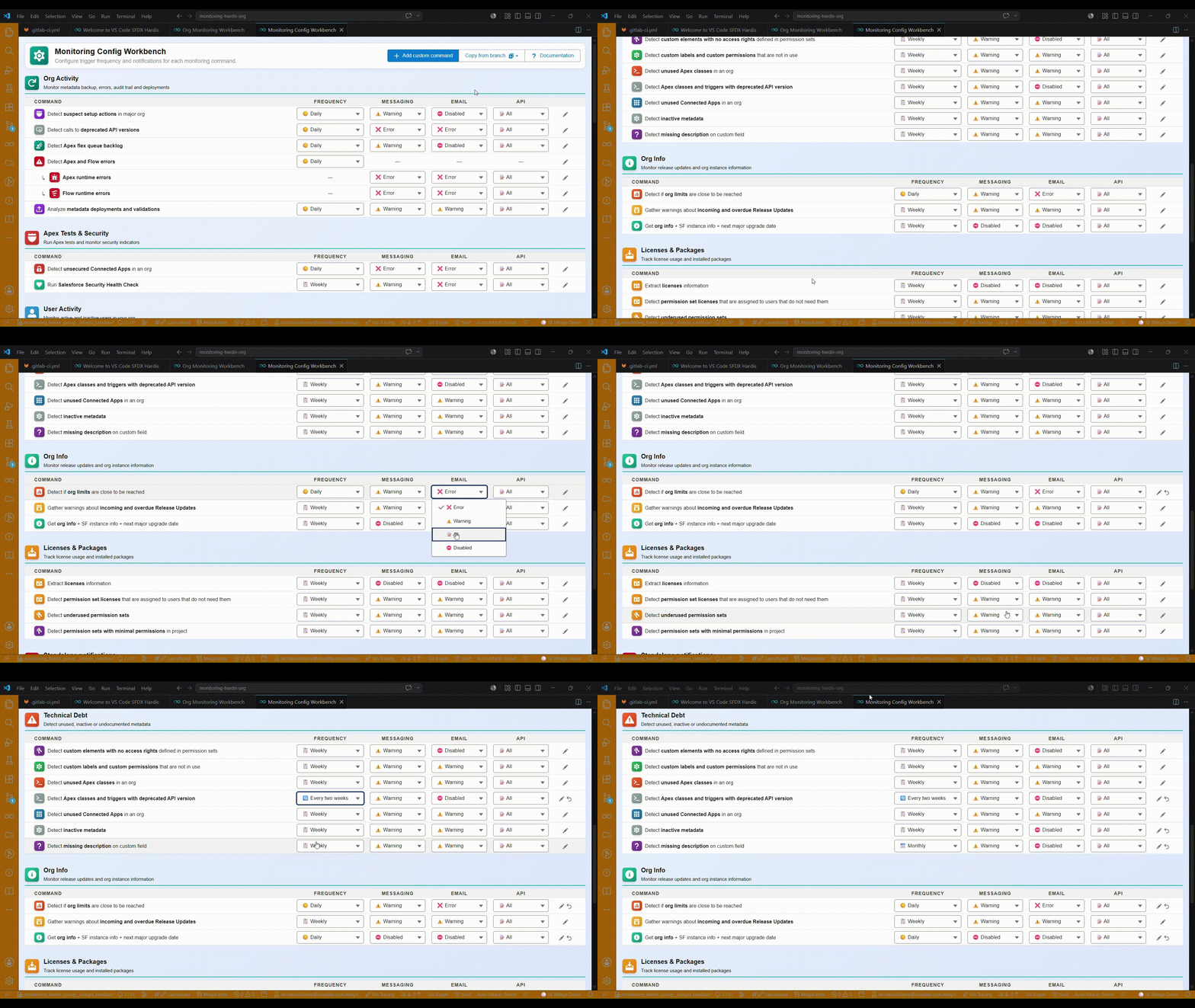
What you get out of the box:
- Daily metadata backup with the exact Git diff between yesterday and today (who changed what, before and after).
- Suspect setup actions detected in the Salesforce Audit Trail, so production changes never go unnoticed.
- Apex tests, code quality (MegaLinter), org limits, deprecated API calls, release updates, unsecured Connected Apps, unused licenses, missing access and more, all scheduled and reported automatically.
- Per-channel notifications routed independently to Slack and Microsoft Teams, email and API / Grafana / Prometheus, with a severity threshold per notification type (stream everything to Grafana, keep Slack for warnings and errors).
- Ready-to-use Grafana dashboards to follow org health, backups, tests, security and license usage over time.
- Fully configurable from the VS Code SFDX Hardis extension or directly in
.sfdx-hardis.yml(frequency, thresholds, channels, custom commands).
Pick CI/CD with sfdx-hardis and you also get a production-grade monitoring stack in the same move. See the Monitoring documentation for the full picture.
Open-source, no license fees
Everything is open-source. There are no license costs.
In comparison, many Salesforce DevOps vendors charge more than 250 EUR per contributor per month.
Run it yourself, or ask Cloudity Professional Services for support.
Used in production worldwide
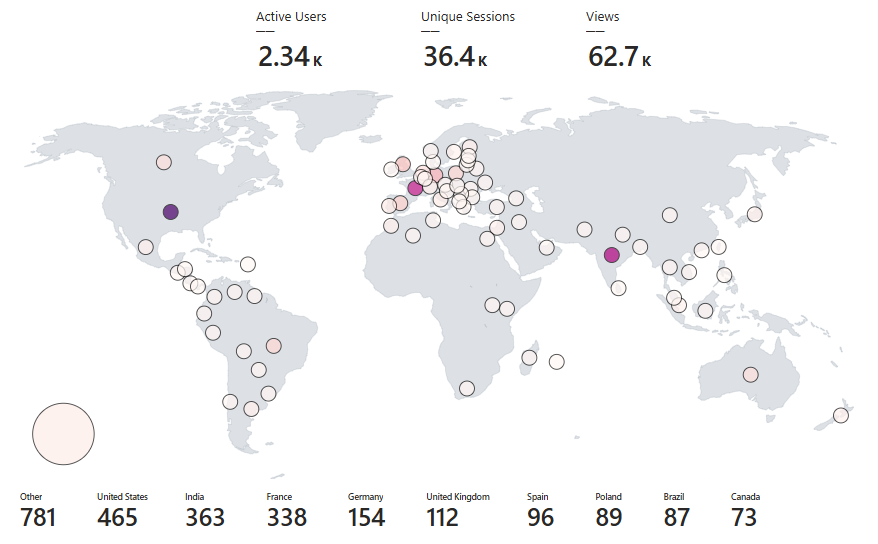
Featured in conferences, blogs and webinars.
Interview on SalesforceBen with a live demo:
The Dreamforce presentation, the slides and the article below were recorded before sfdx-hardis got its current LWC-based UI. The concepts still apply, but the on-screen experience is now built around Lightning Web Component panels instead of CLI menus.
Dreamforce presentation:
Slides from the Dreamforce '23 session:
Detailed article on SalesforceDevOps.net:

Get started
Set it up yourself
Open-source and free. The Setup Guide walks you through the initialization of a Salesforce CI/CD project, from the Git repository to the first Pull Request.
Get help from Cloudity
sfdx-hardis works well on its own. It works even better with the people who built it on your side: a sharper branch model, a cleaner pipeline, edge cases anticipated upfront. Cloudity, the company behind sfdx-hardis, offers four service tiers to match every team's needs and budget.
Assisted Setup: for experienced teams
Best for: teams with solid Git and Salesforce CLI skills who want expert guidance without handing over the wheel.
Your team drives the setup. A Cloudity expert rides along: reviewing your branch model, validating your pipeline configuration, unblocking tricky situations, and making sure you follow best practices from the start.
What's included:
- Branch and org model review and recommendations
- Guided pipeline configuration (CI checks, deployments, notifications)
- Review of your sfdx-hardis configuration files
- Q&A sessions with a Cloudity expert at key milestones
- Guidance and material to train your team on sfdx-hardis best practices
The most cost-effective way to get professional assurance without a full engagement.
Full Setup Service: end-to-end, done for you
Best for: teams that want a production-ready CI/CD pipeline without investing internal time in setup and configuration.
Cloudity takes full ownership. You receive a fully configured CI/CD pipeline, proven on many projects and tailored to your org structure, team size and release process. Ready to go live.
What's included:
- Analysis of your existing Salesforce org and release process
- Full pipeline setup on your Git platform (GitHub, GitLab, Azure DevOps, Bitbucket, Jenkins...)
- Branch model and deployment strategy definition
- Training sessions for contributors, release managers and project leads
- Change management support to accelerate adoption across your organization
- Handover documentation and knowledge transfer
Option: Support Subscription, peace of mind over time
Best for: any team that wants guaranteed access to sfdx-hardis expertise after go-live, and wants to stay ahead of Salesforce releases.
A Cloudity expert is available whenever you need them: to answer questions, resolve blockers and review changes. You also directly fund the sustainability of sfdx-hardis as an open-source project.
What's included:
- A pool of skilled Cloudity experts, reachable by your team
- Priority response for incidents and deployment issues
- Proactive alerts on Salesforce API changes and sfdx-hardis updates that may affect your pipelines
- Access to new sfdx-hardis features and security patches as they ship
- Direct influence on the sfdx-hardis roadmap through feedback and feature requests
Option: Release Manager as a Service, your release process covered
Best for: teams without a dedicated release manager, or who need cover during holidays, parental leave or peak release periods.
A Cloudity release manager takes the wheel, permanently or on demand. Your team keeps shipping and your release cadence stays on track.
What's included:
- Day-to-day management of Pull Requests, deployments and release branches
- Coordination between development, QA and business teams
- Incident response and rollback management
- Available as a permanent service or as a temporary cover arrangement

Next steps
- Contributor Guide: work on a CI/CD project as a business analyst, admin or developer.
- Release Manager Guide: review Pull Requests, drive deployments and releases, configure the project.
- Setup Guide: initialize a Salesforce CI/CD project from scratch.
- Monitoring: back up and monitor your orgs from a separate repository on the same Git platform.