Schedule an Apex batch
Schedule an Apex batch
One of the types of deployment actions, YAML type: schedule-batch. That page explains what all types share: when actions run, how to choose their target orgs, how they are tracked and how to recover a failed one.
Schedules an Apex batch job in the target org, with a cron expression you can build with a click ("every day at 3 AM"...). The class picker proposes the schedulable classes of the org and of the project, and the global schedulable classes of the installed packages.
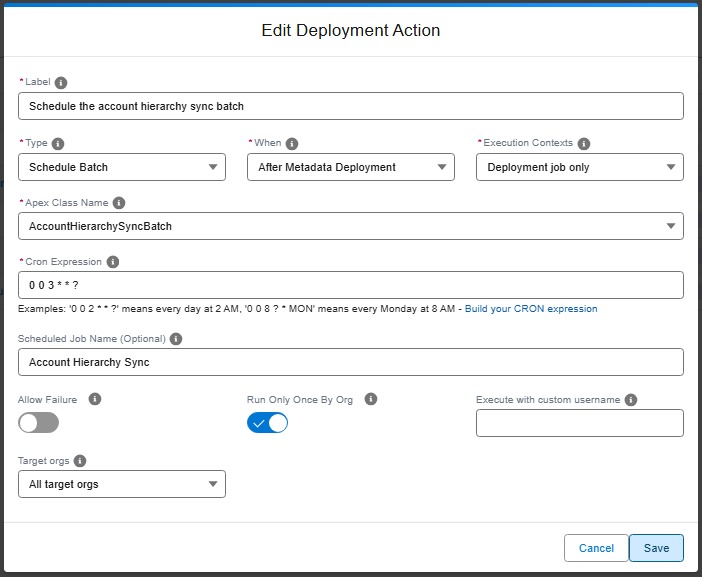
Technical: schedule-batch action (YAML)
Schedules an Apex batch class using System.schedule(). The action verifies that the specified Apex class exists in the org, implements the Schedulable interface, and has a public no-arg constructor. If the class does not meet these requirements, the action fails with a recommendation to use an apex action instead.
The class can come from an installed package. A class of an unlocked package without namespace is named like any other. A class of a managed package is written with its namespace, ns.ClassName, and must be global: a managed package hides every other class, and nothing outside the package can schedule them.
If a scheduled job with the same name and cron expression already exists, the action is skipped (idempotent). If a job with the same name but a different cron expression exists, the action fails so you can resolve the conflict manually.
| Custom parameter | Required? | Description | Example |
|---|---|---|---|
parameters.className |
Yes | Name of the Apex class that implements Schedulable with a public no-arg constructor. |
MyBatchScheduler |
parameters.cronExpression |
Yes | Cron expression for the schedule (Salesforce format). | 0 0 0 * * ? |
parameters.jobName |
No | Name of the scheduled job. Defaults to <className>_Schedule if omitted. |
MyBatch_Nightly |
- id: 1991c08c-a791-4e54-8adb-307ff23b7564
  label: Schedule nightly batch
  type: schedule-batch
  parameters:
    className: MyBatchScheduler
    cronExpression: "0 0 0 * * ?"
    jobName: MyBatch_Nightly
  context: process-deployment-only
Note: If your Schedulable class requires constructor arguments or has a non-public constructor, use an
apexaction with a custom.apexscript instead.
Learn by doing
The free Salesforce DevOps with sfdx-hardis course does this, click by click, on an org of your own: